 | This article does not cite any sources. (March 2022) |

A red Security Camera, indicating the Mastermind is controlling it.
Security Cameras is an environmental component in Resident Evil: Resistance.
Gameplay
Overview
A Security Camera is the only way the Mastermind is able to interact with the stage. With it, they can use their cards and the E.I.S.
Survivors
The Survivors can interact with the Security Cameras in only two ways, either by shooting at it which will deal damage and eventually disable it, or by using one of January Van Sant's skills, either the Fever Skill or Personal Skill.
If players shoot at the camera, a small health bar will appear below it which indicates how much more damage it will need to take in order to be disabled. Once the camera is shot down, the health bar will turn orange and recover, after the gauge is filled up the camera will be usable by the Mastermind again.
If a Survivor disable a camera while the Mastermind is controlling it or while there is an Auto-Turret on it, they will gain +15 on the Timer.
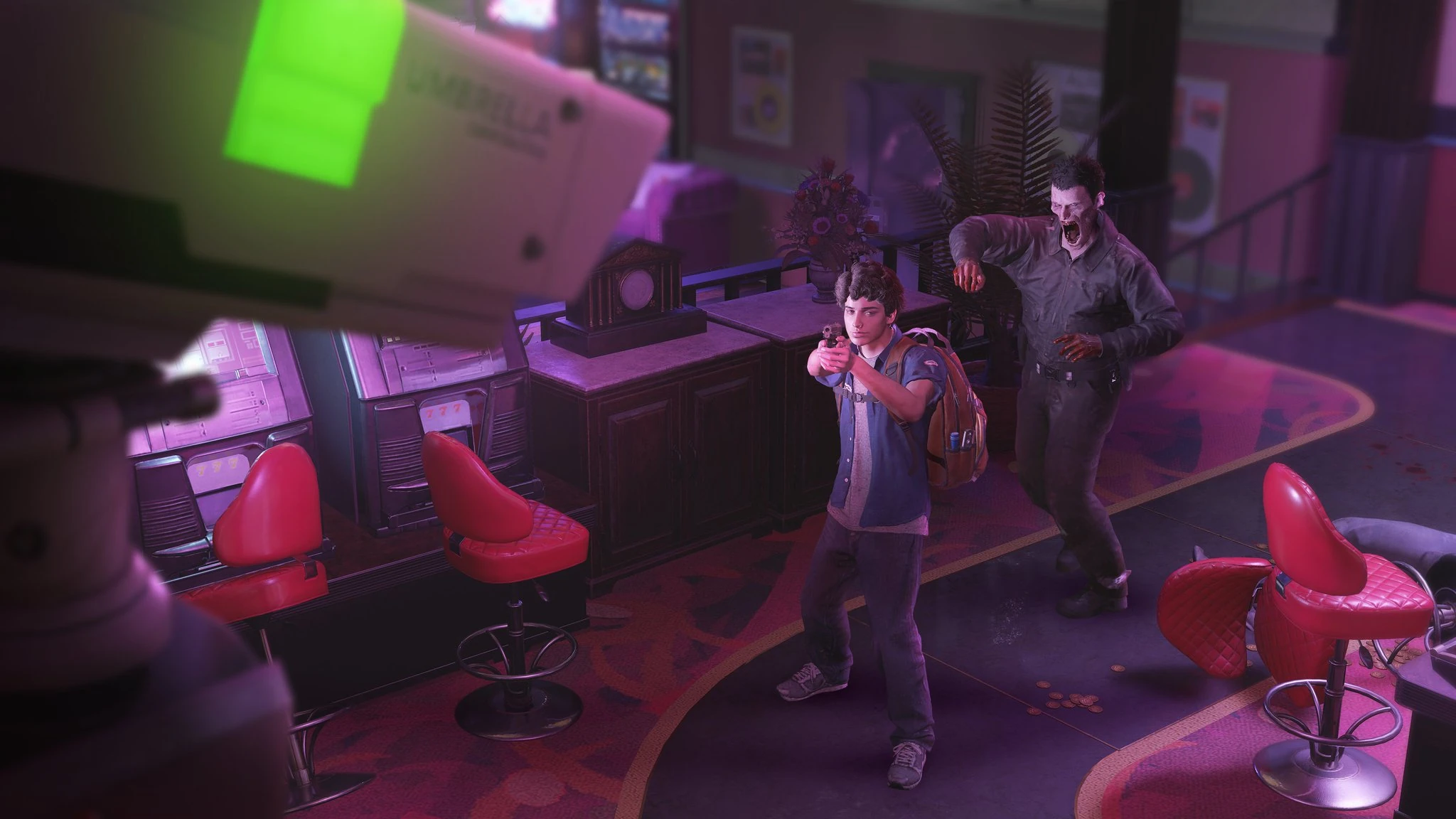
Martin Sandwich aiming at a camera that has a green light on it, as such, the Mastermind is not currently controlling it.
From the point of view of the Survivors, the Security Cameras have the following states and gameplay mechanics attached to them:
- Green:
- Nothing is mounted on the camera, and the Mastermind is not controlling it.
- If the camera is destroyed during this state, it will not add any time.
- Red:
- The Mastermind is on the camera.
- If the camera is destroyed during this state, it will add +15 seconds.
- If the camera is already destroyed, the Mastermind can come back to it and it will turn red during this state as well.
- Blue:
- The Mastermind has mounted an Auto-Turret and is not currently on the camera.
- If the camera is destroyed during this state, it will add +15 seconds.
- The Mastermind can come back to it and it will turn red during this state as well.
- The Mastermind can come back to it and disable the Auto-Turret, denying the time to the Survivors.
- Disabled:
- See below for more information.
January Van Sant
January Van Sant is the Survivor with the most amount of utility against Security Cameras. All of her Personal Skills will affect the camera in some way.
- Overload - Instant
"Instant" will instantly disable a camera of January's choice provided she can complete the hacking animation. January can also use this ability on a camera that is already disable in order to reset the recovering gauge.
- Overload - Lockdown
"Lockdown" will deal damage continuously to one camera of January's choice. It lasts a maximum of 15 seconds as long as January is performing the animation. Lockdown is highly effective on a disabled camera because of its continuous damage, this means it will be extremely difficulty for the Mastermind to recover the camera.
- Overload - Malware
"Malware" allows January to plant a virus on one camera of her choice. The virus will stay on the camera for an unlimited amount of time, if the Mastermind uses any type of card with the exception of Ultima Skill cards, the Survivors will gain +? to the timer.
The only way the Mastermind can counter this skill is by using an Electromagnetic Shield. This will remove the Malware from the camera it is affected only.
Disabled Cameras
When a camera is disabled, a gauge will be present below it which will automatically fill up over time. When this is over, the camera will come back to normal and an Electromagnetic Shield will be placed on it for ? seconds.
The Survivors have two ways to pause the recovering, either by shooting at it or by using January's skills "Instant" (which will reset the gauge) and "Lockdown" which will deal continuous damage to the camera, effectively pausing the recovering process.
If players are shooting at the camera, the gauge will still recover rather quickly depending on the weapon the Survivor is using. If the weapon has a high fire rate, the gauge will take more damage and as such it will "pause", if the weapon has an extremely amount of fire power, the gauge can be reset.[citation needed]
Below are the best options to deal with a disabled camera:
- MQ 11 - High fire rate, it will pause the recovering process.
- LE 5 - High fire rate, it will pause the recovering process.
- ATM-4 with Becca Woolett's Bullet Storm - Extreme amount of damage, it will reset the recovering gauge.[citation needed]
Mastermind
For the Mastermind, the camera is used in a first-person perspective, where the point of view can be changed freely until a certain limit (which creates "blind spots" for the camera). The Security Cameras are a crucial part of the Mastermind's gameplay as it is the only way the player has to interact with the stage.
Every Area has a pre-determined amount of cameras in locations which cannot be altered by Map Presets. Players are able to switch between cameras by either of the following:
- Opening the map and moving the cursor to the desired camera, then use the "Interact" command (default "X" on PlayStation).
- Opening the map and using the "Change weapons" command (default "d-pad arrows" on PlayStation).
- Using the commands for the Fever Skill and Personal Skill (default "L1", "R1" on PlayStation).
It is advised to avoid using the first option listed as it is the slowest.
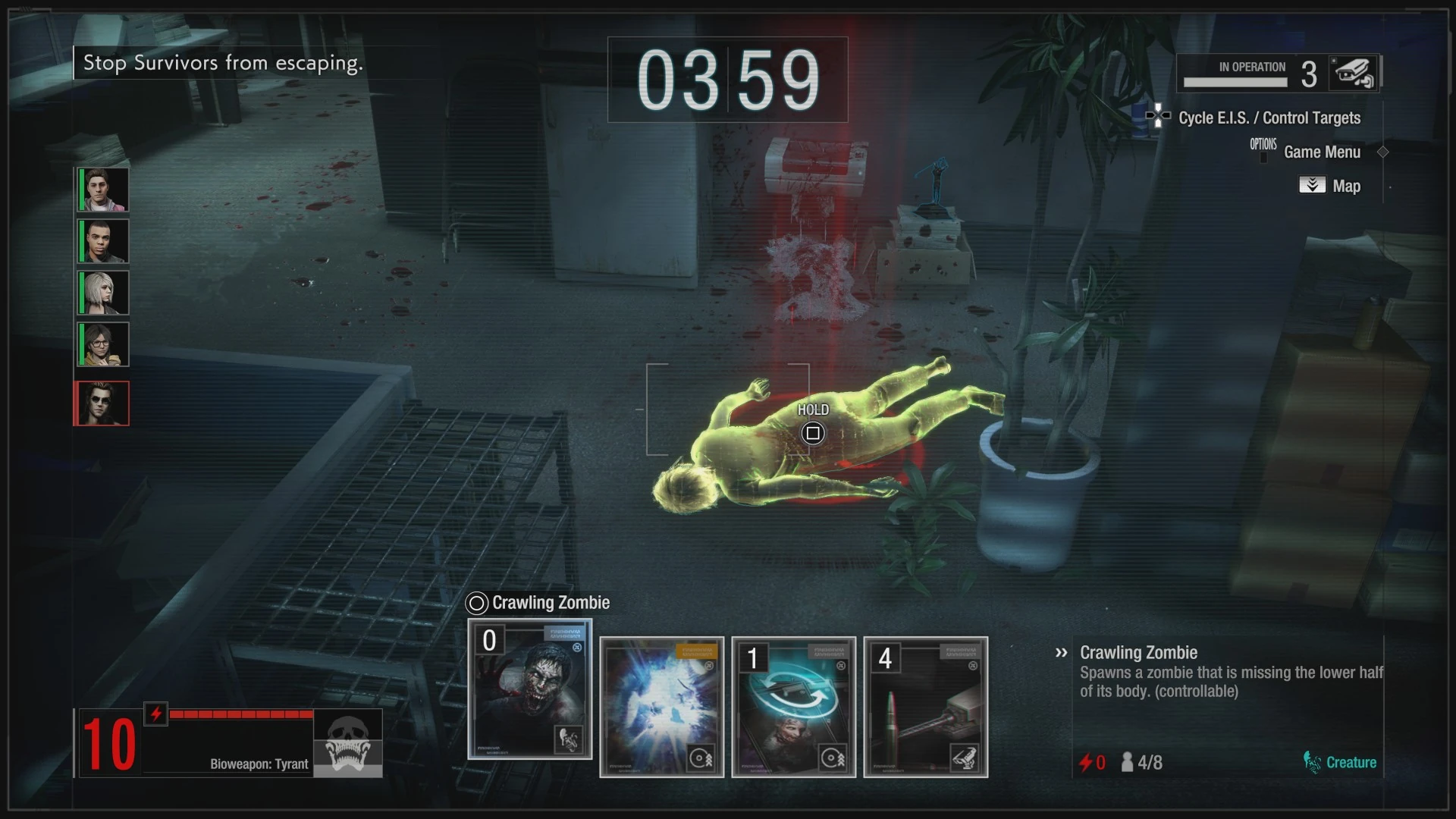
The perspective of the Mastermind when in control of a Security Camera. Its health can be seen at the top right corner of the screen.
In terms of health, the Mastermind is able to see the health of the camera they are in by looking at the top right corner of the screen, the gauge there will always show the current health of the camera the player is in, it is impossible to "check" the health of other cameras unless players select to control it. Oftentimes Survivors will lower a camera's health to a very low amount and perform the final blow when the Mastermind switches to it, hence why players should be using the shortcut commands mentioned above in order to quickly get out of the camera and not feed time.
The number next to the camera's health bar indicates its number within the map, this helps players who use the aforementioned shortcuts to quickly switch between cameras.
When a camera is disabled, the Mastermind is still able to get back to it to help the recovering process, this is done by moving both analog sticks or using the "movement" command (default WASD on PC). It's worth noting that if Masterminds are using equipments which increases the camera's health, this will also in turn make the camera take longer to recover.
In terms of cosmetics, the Security Camera is the only way Masterminds are able to perform their voice lines, when they are in control of a creature, they can only use a gesture or spray.
Placing Creatures or Traps
When placing a creature or trap, players can only spawn them within the camera's field of view. If Survivors have the camera "locked down", as in, for example, they are shooting the MQ 11 at it, players will not be able to move the camera at all or place anything. If they are using a weapon with some downtime between its shots, like the Matilda, the Mastermind can still place the trap, creature or Ultimate Skill if they are quick enough.
In terms of January's "Lockdown" skill, players can still play and place cards freely until the camera is fully destroyed.[citation needed]
There is also a shortcut tied to playing cards, being the "Change weapons" command (default "d-pad arrows" on PlayStation), if players cannot find a spot to place their card, they may push this button to find a location, tapping the button multiple times will show any other possible spot if available. In some situations, particularly in Area 2 of Research Facility, the game will be unable to find a spot with this shortcut, at this point players are advised to manually place the card instead of using the shortcut.
"Camera Snap" Technique
"Camera Snap" example.
The Mastermind is able to perform a technique commonly dubbed as "Camera Snap" by the community, this technique allows players to quickly snap the camera toward a Survivor of their choice instead of slowing moving the camera toward them.
In order to perform the technique, players cannot have an Auto-Turret mounted on the camera they are using because opening the map is required. Below are the steps:
- Open the map.
- Hold the command for "aim" (default "L2" on PlayStation).
- Buttom prompts will now appear on top of the Survivors' icons on the map, push the command tied to the Survivor you'd like to snap to.
Skills and Equipments
Survivors
- Skills
- January Van Sant
- EMP - Interference: Greatly increases the Mastermind's skill cost for 15 seconds.
- EMP - Camera Lockdown: The Mastermind is unable to move their cameras for 15 seconds.
- EMP - E.I.S. Lockdown: Disables Mastermind E.I.S. for 15 seconds.
- Overload - Instant: Disables targeted cameras immediately after a brief startup.
- Overload - Lockdown: Deals massive damage to targeted cameras each second the button is held down. Maximum 15 seconds.
- Overload - Malware: Plants a virus that immediately disables targeted cameras when the Mastermind uses a skill.
- Disruptor Rounds - High Caliber: Greatly increases the damage Jan deals to cameras.
- Disruptor Rounds - Energy Disruption: Dealing damage to active cameras pauses Mastermind Bio Energy recharge for 1 second.
- Disruptor Rounds - Anti-Armament: Lowers the price of all non-firearms in the Armory for Jan.
- Jill Valentine
- B&E Specialist - Countersurveillance: Greatly increases damage dealt to traps and cameras when S.T.A.R.S. Armory is fully charged.
- Valerie Harmon
- Survival Instinct - Cameras: Marks all nearby items, objects, and cameras. Increases damage marked targets receive from all sources.
- Martin Sandwich
- Flash Baton - Shockwave: Blinds cameras and destroys traps within range.
- Equipments
- EMP Rounds I & II: Increases damage to cameras.
Mastermind
- Equipments
- Fuse I, II, & III: Increases camera durability.
- Shock Absorbers I, II, & III: Improves camera control while under attack.
- Reinforced Bearing: Moderately increases camera rotation speed.
- Cooling Fan I, II, III: Decreases the time it takes for a disabled camera to auto-recover.
- Gyroscope: Moderately decreases camera shake when attacked, and moderately increases damage dealt by firearms.
- Thermal Grease I, II, III: Decreases the time it takes to manually recover a disabled camera.
- Modified Gear I, II: Decreases the time it takes to assemble and disassemble firearms.
- Water Cooled Radiator: Moderately increases camera durability, and greatly decreases recovery time.
- Modified Recoil Spring I, II: Decreases the interval between each rifle shot.
Gallery

| |||||||||||||||||||||||||||||
| ||||||||||||||||||||||||||||

.jpg)
.jpg)

